7 Types of Personal Branding Videos That Perform Well on LinkedIn

Scrolling past another generic LinkedIn video? You’re not alone — most users ignore content that doesn’t feel relevant or engaging. But with the right type of video, you can stop the scroll and start real conversations.
In this article, you’ll find 7 types of video content that work best on LinkedIn — from personal storytelling to behind-the-scenes business updates.
We’ll break down proven formats, share examples from top creators, and help you choose the right approach for your goals.
And at the end of the article, you will find how most LinkedIn video creators create videos effortlessly.
1. Storytelling or Journey Updates
What it is: Share a personal story, a big lesson, or something you’re working through.
📍 Best for: Emotional connection and showing growth.
✅ Why it works: People remember stories, not stats.
Example:
“Remote work was costing me my health. When I started working remotely, I thought I had it all figured out. No commute. My own schedule. Flexibility for days.....”
Video Credit - Joe Gannon
Did you know: You can create similar video with Magic Edit and add B-rolls, AI music, emojis, and more to it by just uploading and selecting a Preset.
2. Talking Head Rants or Insights
What it is: A casual, direct-to-camera video sharing a thought, opinion, or lesson.
📍 Best for: Weekly content or sparking engagement.
✅ Why it works: Shows your personality and thinking style.
Example:
“LinkedIn video is the ultimate positioning hack. But when you post, it gets 0 views. And when you follow advice it still fails. Just YESTERDAY, my video got 1M Impressions....”
Video credit - Lara Acosta
3. Behind-the-Scenes / Day-in-the-Life
What it is: Show what your work looks like in real life. No filters.
📍 Best for: Founders, freelancers, creators, and consultants.
✅ Why it works: Relatable = trustworthy.
Example:
“A quick look at my client onboarding process. I use Notion to create a custom workspace for each brand I work with—here’s how I set one up.”
Video credit - Katie A.
4. The Intro Video
What it is: A quick intro—who you are, what you do, and why you do it.
📍 Best for: Profile video, pinned post, or reintroducing yourself.
✅ Why it works: It’s your digital handshake. Helps people “meet” you instantly.
Example:
“Hey, for those who don't know me, I am Mariam. And those who do, yes this is my first ever video on LinkedIn...”
Video Credit - Mariam Gogidze
5. “I Believe…” or Values-Based Videos
What it is: Share what you stand for—work ethic, leadership, creativity, whatever matters most.
📍 Best for: Clarifying your POV and attracting the right people.
✅ Why it works: Personal branding = being known for something.
Example:
“We’re all fallible. We mess up. We misjudge. We assume. And the hardest lesson? Knowing when to listen and when to help. Not every problem needs a fix. Not every struggle needs advice...”
Video Credit - Beatrice Vladut
6. Micro-Lessons or How-To Tips
What it is: Short, practical tips people can use right away.
📍 Best for: Delivering quick wins and building authority.
✅ Why it works: You become helpful and follow-worthy.
Example:
“Want more "reach" on LinkedIn? Try video. It is growing 2x faster than ANY other format. Here are 4 tips to make it work for you..."
Video Credit - Fatima Khan
7. “Here’s What I’m Working On” / Building in Public
What it is: Share your current project, idea, or experiment—even if it's unfinished.
📍 Best for: Founders, creators, and career changers.
✅ Why it works: People love progress stories.
Example:
“I went from 0 to 60,000+ LinkedIn followers in 2 years. And to show how simple it is, I made you a gift…”
Video credit - Dakota Robertson
✨ How to Create Polished, LinkedIn-Ready Videos (Without Hiring a Video Editor)
So, you’ve got the idea about the various type of video content that work on Linkedin. And You probably know what type of video you want to create.
But the next question is:
“How do I actually make this look good… without spending hours editing?”
That’s where Magic Edit by Jupitrr AI comes in.
Whether you're recording a quick talking head video, sharing a behind-the-scenes moment, or teaching a bite-sized lesson—Magic Edit turns your raw clips into scroll-stopping content optimised for LinkedIn.
Here’s how to edit LinkedIn video in 5 simple steps:
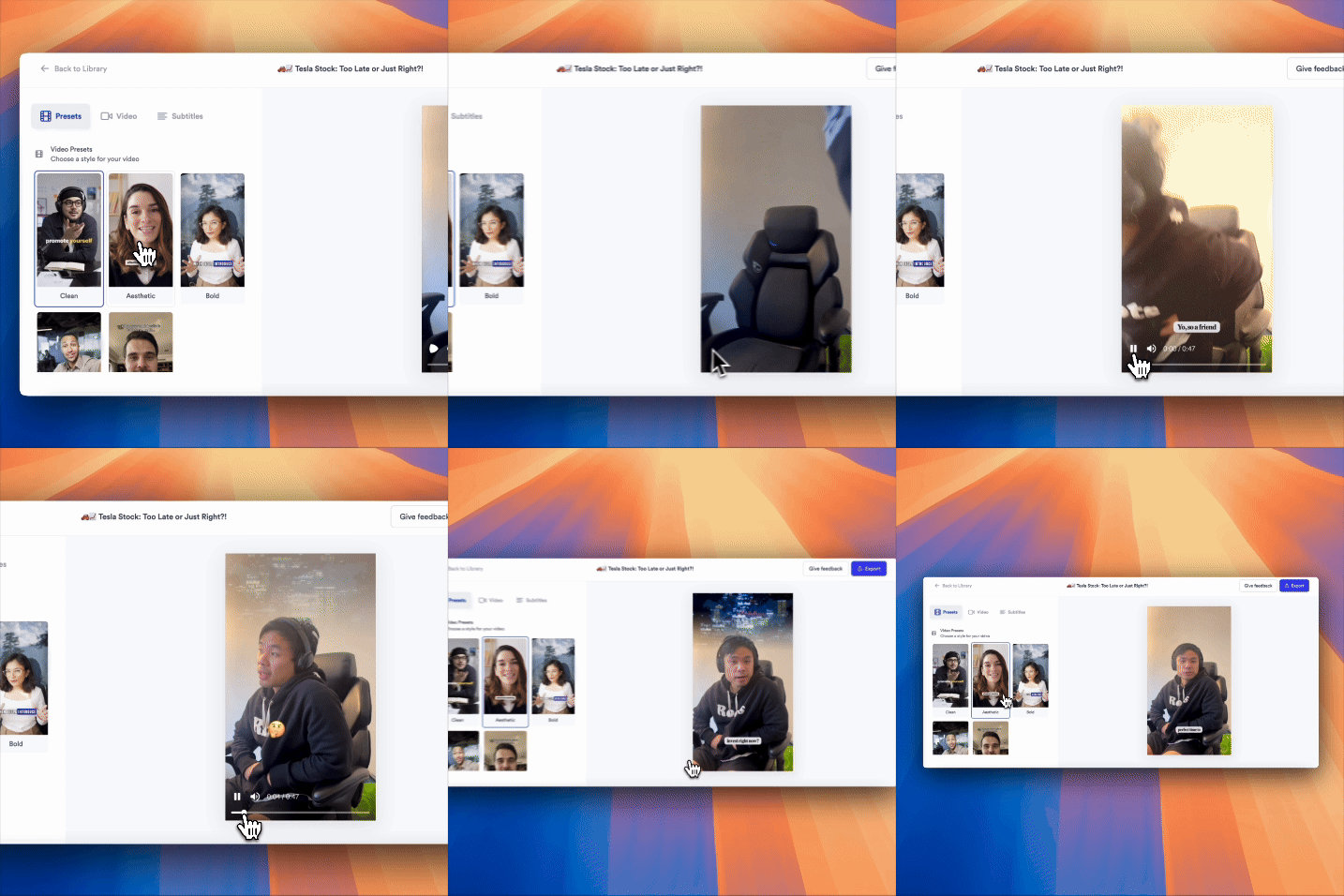
- Sign up for free at Jupitrr AI
- Go to Magic Edit
- Upload your talking head video
- Choose a preset that fits your vibe or topic (e.g. professional, casual, colourful)
- Export your polished, LinkedIn-optimised video
The AI handles the editing part:
- Adds captions with emojis
- Add super relevant B-rolls
- Layers in background music
- Makes your video feel like it was edited by a pro—in minutes
🎥 Why Is It Important to Post Video on LinkedIn?
Video is the most human content format—and LinkedIn is where professionals go to connect, not just scroll. When people can see your face, hear your voice, and understand your tone, they’re far more likely to trust you.
Here’s why video matters on LinkedIn:
- Higher engagement: LinkedIn users are more likely to comment on videos than on text-only posts.
- Better recall: People remember 95% of a message when they watch it in a video, compared to 10% when reading it.
- Stand out in the feed: Most LinkedIn content is text-heavy—video helps you instantly stand out.
- Builds trust: Seeing you speak builds familiarity and connection faster than a polished paragraph ever could.
Whether you're a creator, founder, consultant, or job seeker—video is your shortcut to becoming more visible, credible, and memorable.
🎬 Final Thoughts
Video content on LinkedIn isn’t just a nice-to-have anymore—it’s one of the fastest ways to build trust, authority, and genuine connections at scale.
Whether you’re just starting out or looking to grow your presence, these 7 video content types give you a simple framework to show up consistently and meaningfully. From quick tips to personal stories, you don’t need a big production budget—just a clear point of view and a bit of structure.
And with tools like Magic Edit by Jupitrr AI, creating polished, LinkedIn-ready videos is easier (and faster) than ever.
So pick a format, hit record, and let your voice lead the way.
Your next great LinkedIn video could be just one click away.